Also available in: Tiếng Việt · Bahasa Indonesia · ภาษาไทย · Português · Қазақша · 中文 · Français · العربية · Русский · Español
On this page
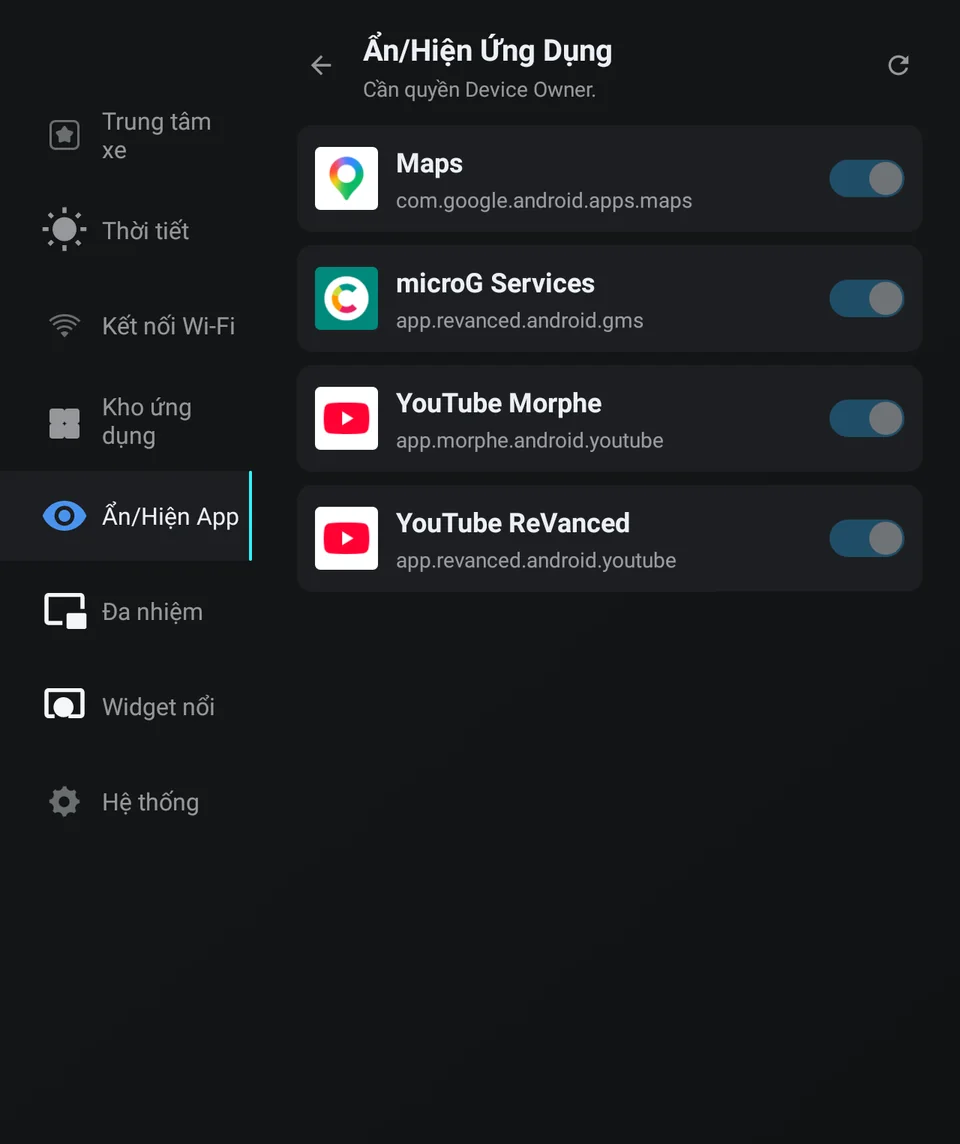
Apps you install on the Jaecoo J7 or Omoda C5 pile up on the screen, and some you rarely open. JaecooApp’s App Manager hides them from the launcher with one switch per app, and shows them again just as easily.
Before you start
Hiding apps needs Device Owner, which the installer grants when it installs JaecooApp. Without it, App Manager shows Hiding apps needs Device Owner.
Which apps you can hide
App Manager lists the apps you installed, such as YouTube, Google Maps or Waze, and pre-installed apps that have been updated since. Untouched system apps of the car don’t appear, and neither do JaecooApp itself and the launcher, so you can’t hide your way out of the home screen. For the car’s own navigation, use Disable native maps.
Hide an app
- Open JaecooApp → App Manager.
- Turn off Show next to the app. It’s marked Hidden and disappears from the launcher.
Turn the switch back on to show it again. The top line counts your apps, the hidden ones and available updates; apps from Jaecoo Store can be updated right there.
Good to know
- A hidden app can’t be opened until you show it again, from the launcher or from the floating widget ring.
- Hiding keeps the app’s data and sign-ins. Show it again and it is exactly as you left it.
- JaecooApp remembers which apps you hid, so they stay in the list even though Android treats them as gone.
- Before you uninstall JaecooApp, show your hidden apps again: once Device Owner is revoked, JaecooApp can’t change them any more (details).
Frequently asked questions
Are hidden apps uninstalled?
No. They stay installed with their data, just off the launcher. Switch them back on to show them again.
Why isn't a built-in app of the car in the list?
App Manager only lists apps you installed and pre-installed apps that have been updated. Untouched system apps are left out.
Can I hide JaecooApp itself?
No. JaecooApp and the launcher never appear in App Manager, so you can't lock yourself out.